Table of Contents
Zephyr
Zephyr supplies the RTOS kernel, drivers, board descriptions, shell, filesystems, and build tools used by K-FSW. Its native simulator runs the application on Linux for service and integration tests.
Kconfig selects software; devicetree selects devices and wiring, so no service names a board. K-FSW calls Zephyr APIs directly: reusing a module or service on another RTOS means porting its kernel, device, storage and build dependencies, as well as the platform layer.
Kernel use
| Primitive | K-FSW use |
|---|---|
| Thread | Router, service workers, shell, application |
| Mutex | Shared parameter, persistence, storage, and client state |
| Workqueue | Deferred device work such as button debounce |
| Timeout and sleep | Bounded waits and periodic work |
| Spinlock | Short event-ring updates |
Calls that wait on a mutex, the filesystem or the network must run in a thread. Check each public API before calling it from an ISR. UART reception ingests bytes and leaves packet routing to the CSP router thread.
See Zephyr's threads and mutexes.
Devices
Devicetree identifies an instance; Zephyr creates its struct device. Check device_is_ready() before using the driver API.
For example, a chosen UART selects the device consumed by the KISS adapter. A chosen flash partition selects the LittleFS volume. K-FSW services use Zephyr's filesystem calls once storage is mounted.
See the device model.
Kconfig
Every service, adapter and limit is a Kconfig symbol. The golden recovery image drops the shell and the file services by configuration alone (config/profiles/nucleo-golden.conf), from the same tree as the full composition.
Configuration is combined at build time:
CONFIG_KFSW_* symbols select services and their startup and shell code. Dependencies are checked by Kconfig: remote parameters need PARAM and CSP; FTP needs CSP and storage.
Inspect the generated result from the workspace root:
Change the source .conf or Kconfig file and rebuild. See the Kconfig guide.
Browsing the options
Zephyr ships the same terminal chooser the Linux kernel uses. It needs a build directory that has already been configured, so build the target first:
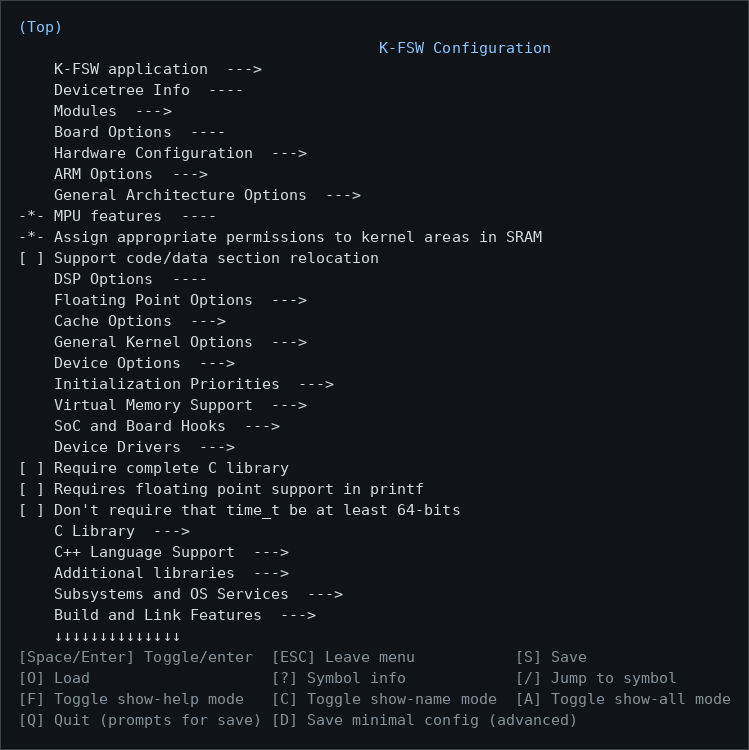
Arrow keys move, space toggles, / searches the whole tree and ? shows where a symbol is defined and what depends on it. west build -t guiconfig opens the same thing as a window instead, which needs an X display.
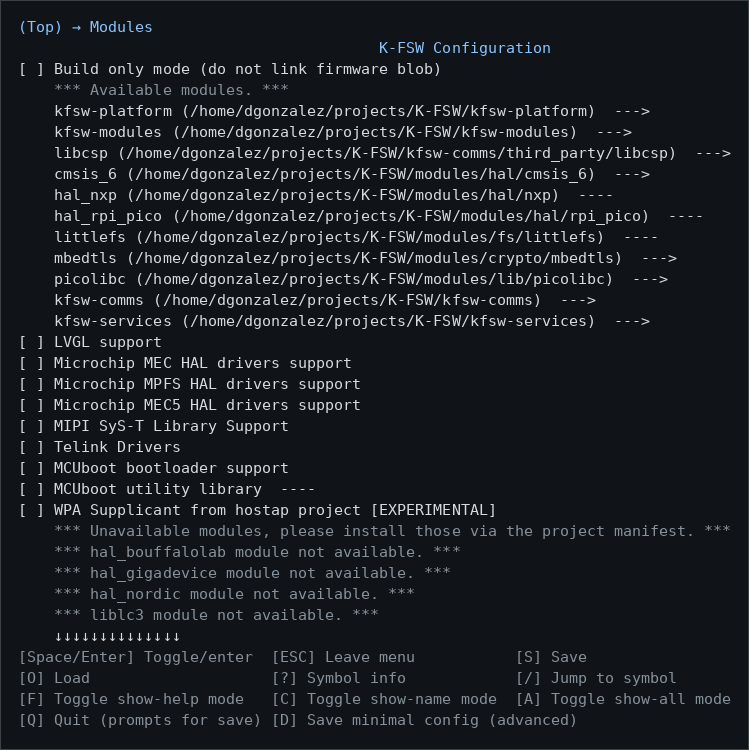
It lists every option the build knows, not only K-FSW's: CONFIG_SHELL_STACK_SIZE and CONFIG_CSP_BUFFER_COUNT sit under their own subsystems. The K-FSW options are five menus, one per repository:
K-FSW application is the first entry at the top; the other four are under Modules, next to the HALs and the Zephyr modules, each one named after the repository it comes from and the path it was resolved to.
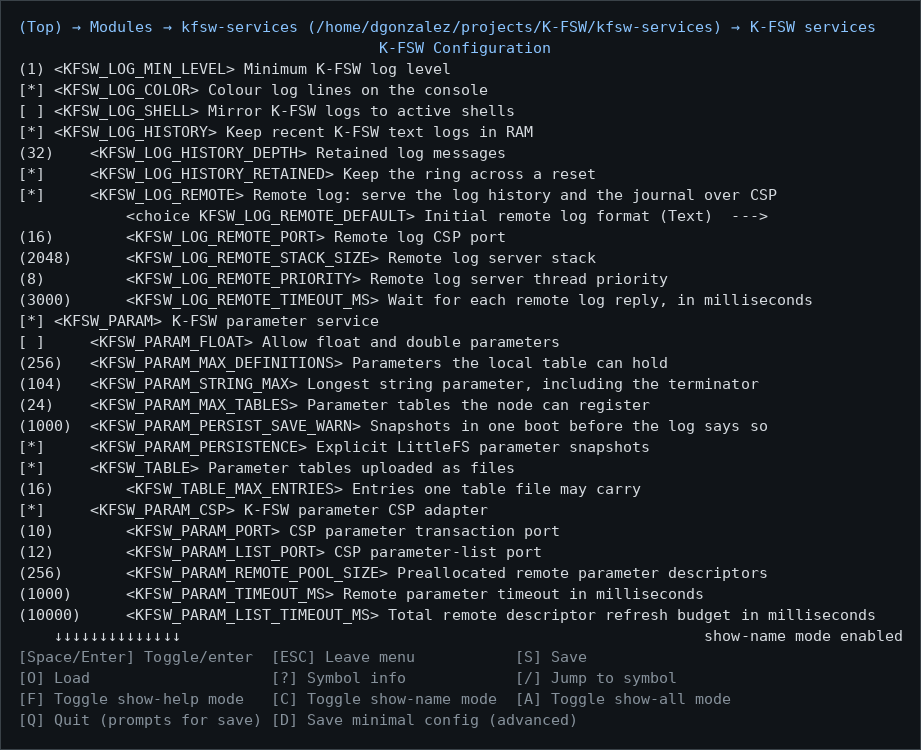
Inside a menu the options are nested the way they depend on each other, so turning off a service takes its ports, stacks and limits with it. C adds the symbol name to each line, which is what a .conf file wants:
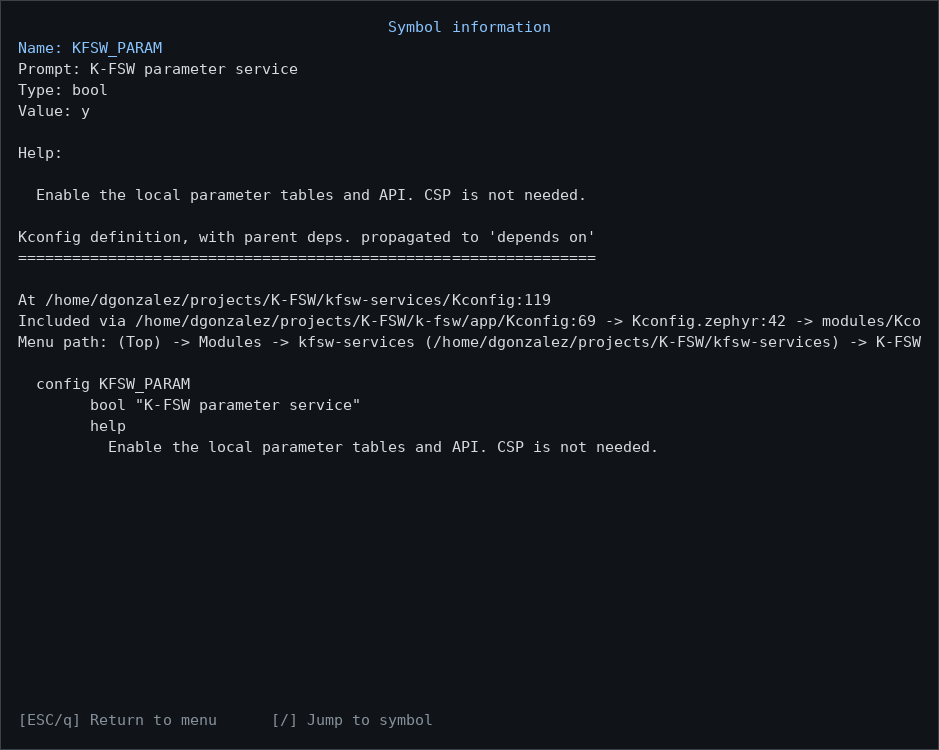
? on any line answers where the value came from, down to the file and line that defines it and the menu path that reaches it:
Keeping what you chose
The chooser writes build/<target>/zephyr/.config, which is a build artefact. It survives an incremental west build and reaches autoconf.h, so a change can be tried straight away, but a pristine build regenerates it from the .conf files and the choice is gone. tools/build.sh builds with west build -p auto, and tools/golden.sh and CI use always.
Copy the file first, then compare. diffconfig -m prints the difference in .conf format. Here, remote execution was turned on in a build without it:
Turning one option on brings its defaults with it. Keep only the lines that are a decision; the six defaults above are already in Kconfig.
Then put the kept lines where that target or variant is composed: a board file such as app/boards/nucleo_l496zg.conf for everything that target always has, or a profile in config/profiles/ for a variant. To find which file sets an option today, read build/<target>/zephyr/.config-trace.json, where every symbol carries its value and the file and line it came from.
A composition with profiles
The chooser knows nothing about layering: it shows one resolved configuration. To work on a layered one, build it with its profiles and then open that build directory:
The comparison then shows what the profiles set as well as what you changed; check each line against the profiles before copying it.
Devicetree
Use overlays for hardware instances, pins, baud rates, and flash regions. The NUCLEO UART/KISS profile uses:
kfsw,storage-partition selects the storage partition. kfsw,tmp-disk selects the zephyr,ram-disk behind /kfsw/tmp; the NUCLEO points it at SRAM2 with ram-region = <&sram1>. Multi-link profiles declare separate named interfaces; see CSP and links.
Inspect build/<target>/zephyr/zephyr.dts to confirm the final hardware description. See the devicetree guide and overlay how-to.
Boards and K-FSW targets
| K-FSW target | Zephyr board |
|---|---|
linux | native_sim/native/64 |
nucleo_l496zg | nucleo_l496zg |
nucleo_f746zg | nucleo_f746zg |
frdm_k64f | frdm_k64f/mk64f12 |
rpi_pico_w | rpi_pico/rp2040/w |
config/targets/<target>.env maps the target to its board and tool defaults. Board configuration and overlays live under app/boards/; optional compositions live under config/profiles/.
See Boards and targets for supported features and bench results. For new hardware, start with Zephyr's board-porting guide.
west
west update checks out the revisions in west.yml. west build, west flash, and west debug invoke Zephyr's tooling.
From the workspace root:
Preserve local dependency changes before updating. Detached HEAD at a manifest SHA is expected; Contributing covers dependency branches.
See the west guide.
Build output
CMake resolves the board, Kconfig, devicetree, and module sources; Ninja compiles and links the image.
File under build/<target>/ | Use |
|---|---|
zephyr/.config | Resolved software selection |
zephyr/zephyr.dts | Resolved devices and wiring |
zephyr/include/generated/ | Generated configuration headers |
compile_commands.json | Compiler flags, include paths, IntelliSense |
zephyr/zephyr.elf | Symbols and source debugging |
Regenerate these files by rebuilding. See the CMake build guide.