Table of Contents
Workspace
K-FSW is a west workspace. The k-fsw repository has the manifest and the application; west checks out Zephyr and the other four K-FSW repositories next to it.
The commands in this manual assume:
Run the project scripts from the workspace root; they activate .venv themselves. Plain west commands need the environment activated, or .venv/bin/west.
Host requirements
CI uses Ubuntu 24.04 and Python 3.12. Other Linux distributions work if they meet the Zephyr 4.4.0 requirements.
| Tool | Needed for |
|---|---|
| Git, CMake 3.20.5+, Ninja, devicetree compiler, host compiler | Workspace and native build |
Python 3.12+, venv, west, Zephyr Python requirements | Configuration, build and tests |
Zephyr SDK with arm-zephyr-eabi | MCU images |
| Doxygen | HTML manual and API |
| Pandoc and WeasyPrint | PDF manual |
| clang-format and cppcheck | Quality checks |
| Valgrind | Memory checks |
| socat and tmux | Two-node and Robot terminal tests |
| OpenOCD, USB access, serial tools | Flashing, debugging and hardware tests |
Follow the Zephyr getting started guide for the host packages and the SDK. On Ubuntu:
On an AArch64 host, leave out gcc-multilib and g++-multilib. Install a Zephyr SDK that works with Zephyr 4.4.0, either where Zephyr finds it or with ZEPHYR_SDK_INSTALL_DIR set.
Create a workspace
In an empty directory, clone the manifest repository:
Create the Python environment and install west:
Initialize west from the local manifest and check out the pinned revisions:
zephyr-patch.sh applies two patches from k-fsw/patches/zephyr/ to the pinned Zephyr: the shell Tab help, which lists one option per line with its help, and the ZMS close error, which is mandatory. It reports a patch that is already applied. Builds never apply them, so run the helper after every west update. With --check it only reports; tools/ci/all.sh and tools/release.py run it that way and stop if a patch is missing or conflicts.
Install Zephyr's Python requirements and export its CMake package:
Initialize the submodules:
The submodules are the Robot terminal runner and the Yamcs configuration. The application build doesn't need them.
Update a workspace
When k-fsw/west.yml changes:
Save local dependency changes before updating; west update refuses to overwrite a modified file. The patch helper accepts a pristine or an already patched Zephyr and refuses anything else, including an earlier revision of a patch. It names the conflicting file (subsys/shell/shell.c or subsys/kvss/zms/zms.c). Restore that file with git -C zephyr checkout -- <file>, which discards any other local edits to it, and run the helper again. Dependencies end up on a detached HEAD at the manifest commit.
First KFSW-Linux build
This builds the linux target (native_sim/native/64) into build/linux/. The executable is:
The generic command does the same:
The script prints the target, board, output directory and pristine mode before calling west build. Normal builds are incremental (KFSW_PRISTINE=auto). After changing the board, toolchain or modules, force a full reconfigure:
Don't edit build/linux/zephyr/.config by hand; change the Kconfig, .conf or overlay and rebuild.
Run KFSW-Linux
The script builds if needed and starts the executable with a persistent flash file. Startup looks like:
The native UART driver also prints a PTY for CSP. Keep using the current terminal for the shell.
After @READY, try:
Node 1 can't ping node 2 until a peer and a serial bridge are running. tests/csp-smoke.sh and the Robot terminal suite set that up.
Press Ctrl-C to stop the node. The flash file is kept, so saved parameters and FTP files are still there on the next run.
Inspect a build
To see what a build was configured with:
To browse the options instead of the result, open the terminal chooser on a build directory that has already been built:
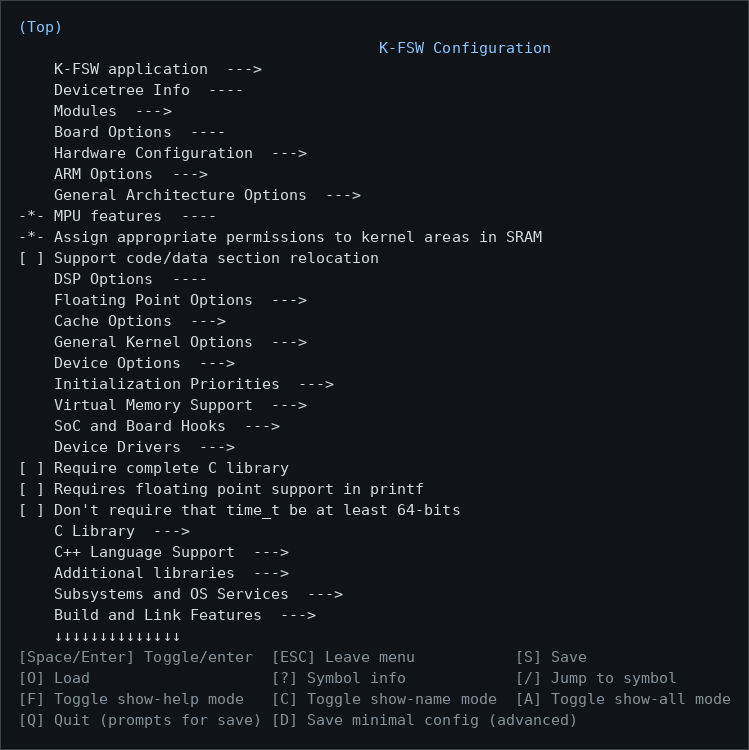
It covers every option the build knows, K-FSW's and Zephyr's: this application is the first entry, and the four other K-FSW repositories are under Modules. What the chooser writes is a build artefact; Zephyr integration says how to keep a choice in a .conf.
Other useful files:
version and status print the board the image was built for.
Build the reference targets
Build both CI targets from clean directories:
Or one at a time:
CI builds only these two. The FRDM and Pico targets build the same way:
See Boards and targets for what each profile includes.
NUCLEO flash, serial and debug
Connect the NUCLEO through its ST-LINK, then build and flash:
Capture 30 seconds of console output:
Use /dev/serial/by-id/ paths on a bench:
A terminal program needs 115200 8N1. This is the ST-LINK console; the CSP link is on USART3, see CSP and links.
To debug with Zephyr's OpenOCD runner, start the server:
Then, in another terminal:
debug.sh starts GDB through west. A VS Code Cortex-Debug configuration can use the same ELF and OpenOCD server instead.
Software checks
While working, run the checks that cover your change:
To run the full software sequence:
See Tests for focused checks and bench tests.
Build the documentation
Install Doxygen for the HTML and the PDF dependencies in the workspace environment:
Build both:
The output is not committed:
Serve the HTML from the workspace:
The HTML includes the C API; the PDF only has the manual.
Add a module
A module is the code for one device or subsystem. Start from the temperature example in kfsw-modules/temperature-sensor-example/: it runs on KFSW-Linux without hardware and has a parameter table, a command, a shell group and events. Its README.md lists the files.
Run the example first
The example is off in the default Linux build. Its profile turns it on:
After @READY:
native_sim has no temperature sensor, so the reading is the reserved invalid value and temp_valid is 0. The table, the counters, the alarm setting, the command and the events behave as on a board. To turn the example off, build again with KFSW_PRISTINE=always and without the profile.
Copy it
- Copy the directory to
kfsw-modules/<your-module>/and rename the files, thekfsw_temp_example_prefix and theKFSW_TEMP_EXAMPLE_Kconfig symbols to your module's name. The places that need your hardware are markedTODO(template). - Add the module to
kfsw-modules/Kconfig(onesourceline) andkfsw-modules/CMakeLists.txt(oneadd_subdirectory_ifdef). - Pick a free parameter table between 50 and 99. Table numbers and parameter names must be unique on a node, and a duplicate stops every table from registering at startup. Prefix every parameter name with the module's short name.
- Put the hardware behind the backend file, the
_sensor.cof the example. The rest of the module must build and run without it, so the unit tests can run on native_sim. Bind the device in devicetree, never by board name. - In
k-fsw, link the module inapp/CMakeLists.txt, add its parameter set toparameter_sets[]and its command set tocommand_sets[]inapp/src/main.c, and call itsinit()in the module stage ofmain(). Architecture lists the stages. Copy the example's tests in
kfsw-modules/tests/temperature_sensor_example/and run them:west twister -p native_sim/native/64 -T kfsw-modules/tests/<your-module>- Add a profile under
config/profiles/that turns the module on, aslinux-temperature.confdoes, so it can be built and checked without changing the reference compositions. - If the module registers shell commands, put that file in a Zephyr library of its own, as the example's
CMakeLists.txtdoes. A shell group is reached only through a linker section, so an archive member that holds nothing else is never linked and the commands are missing fromhelpwithout an error. Zephyr links its own libraries whole.
A module calls the services and the platform, never the other way round (Architecture). If two modules need the same mechanism, it belongs in a service. Data flow shows how the module's values and commands reach the ground.
Check it
Then build the target board. A module that talks to hardware also needs a bench test; Tests describes the existing fixtures.
Common problems
west is not available
Activate the workspace environment:
If .venv has no west, install it with that environment's Python.
A pinned repository is missing
From the workspace root:
Do not clone a branch into that directory by hand.
The MCU toolchain is not found
Check the Zephyr SDK installation and set, for example:
Then build with KFSW_PRISTINE=always so CMake picks up the new toolchain.
A serial device changes name
Use a /dev/serial/by-id/ path and export KFSW_SERIAL, or the variable the test asks for. Check the group permissions and that no other terminal has the device open.
A command is missing
Commands depend on Kconfig. Check the target .conf and the generated .config. The FRDM image has no CSP, parameter, storage, UART or FTP commands.
Old state in storage
The Linux runner keeps its flash file between runs; tests use their own files. For a clean start, move build/linux/kfsw-storage.bin aside or use the simulator's flash erase options.
Next
Read Architecture and Zephyr integration before adding a service or target, Contributing before changing a dependency, and Shell commands for the shell.